
 Articles in this support section discuss Telebroad's legacy APIs. To learn about the current version of Telebroad APIs, which offer additional authentication options and support for advanced features, please go to https://developers.telebroad.com/.
What is an API?
API stands for Application Programming Interface. It is a set of subroutines, protocols, and tools that define methods of communication between various software components. Each such software component has specific commands and format to perform the communication - hence the need for having clear API documentation.

The communication can take place on a specific computer (like a software talking to the the operating system) or over the web. With the latter we usually refer to a client’s computer sending API requests to a server.
This is indeed similar to web surfing with your favorite browser. But instead of getting predefined multimedia HTML web pages or an application functionality as your output, API requests will usually only return pure data from the server or perform one specific service. In certain situations this is just more efficient, and by combining different API commands you can perform sophisticated server operations.
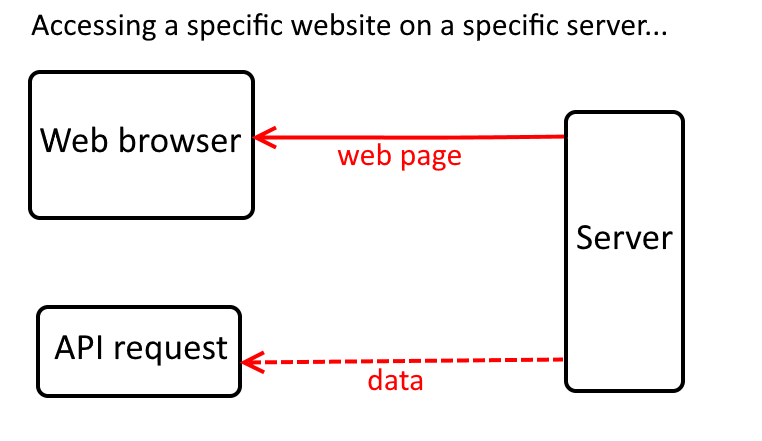
Let’s illustrate this with an example. Let’s say you want to copy all your contacts from your TeleConsole account. Using your browser or the TeleConsole app, you will have to click on each contact and copy-paste into a text document. But instead, using a single API request you can have the TeleConsole server send you all your contacts in mere seconds as one text document.
What is REST API?
REST stands for Representational State Transfer. It is a kind of API that is specifically designed as a web service. A web service, very simply, is a protocol that allows a program to communicate directly to a web page, without needing to use a browser or having a user interact with the page.
We illustrated this by talking about getting contacts from the TeleConsole. Extending on this, we can say that instead of using a browser to communicate with the TeleConsole's web page or app, you would use an API client program to send an API request to the TeleConsole, initiating a web service communication.
Another example – you can get a weather for your local city from a weather forecasting website using a web browser. You will need to go to the web page and enter the name of your city. But if you know the REST API command for this website, you will get the data faster (assuming you have typed it before). You can even create a small program that displays this data automatically for you, essentially functioning much like a weather app on your smartphone.
Basically, we are still talking about a web server sending data over an Internet connection, but with REST APIs you can bypass using a web browser and perform specific operations more quickly.
The following links to a website where you can experience a real weather API with a convenient interface. It also works on many other popular websites and can give you valuable understanding of API functionality and usage.
https://apigee.com/console/
REST API Formats
When typing a URL address or clicking on a web page you are sending a request to a web server that in turns return a resource - another web page, a picture, a video etc to your web browser. The communication is performed using the HTTP protocol - HyperText Transfer Protocol. The data that the server sends back is written in HTML - HyperText Markup Language. HTML is the internet's standard for website creation since its foundation. Your browser reads the HTML code and uses it to display the resources accordingly in the form of a web page.
When sending a REST API request, the communication is still performed with the HTTP protocol (or its secured version - HTTPS). But the data that is returned is written in the JSON format. JSON stands for JavaScript Object Notation. It is a format that is designed for interchanging data. The format is easy for human users to read. It is also easy and fast for computers to generate and parse.
Java is an object-oriented programming language. Objects are pieces of software that perform certain functions. When your browser receives a JSON code in response to a REST API request it does not get the object (or resource itself), but its representational state. Simply put, that means JSON gives you the value of the object.
Let's put this all together now with the weather example from above:
- You will be sending a REST API request to the web address of the weather forecasting server using the HTTP protocol.
- To send the request, you will entering a code into a web browser address bar.
(Note this is a hypothetical example. No such real sever exists)
http://API.weatherserver.com/get/forecast?w=2459115&u=f - The code includes the "GET" method. It is a REST API method for reading data.
There are other methods for writing, updaing, or deleting data, explained here. - The code also includes some parameters specific to this website. You will need to read the site's API documentation to know about them.
- W=2459115 is the location information for New York City. It is in a WOEID format (Where On Earth Identifier).
- U=f designates that the temperature units are requested in Fahrenheit.
- W=2459115 is the location information for New York City. It is in a WOEID format (Where On Earth Identifier).
- Based on the parameters you provided, a certain Java program (object) on the server will fetch the relevant data from an external sensor.
- The Java object will now contain the requested temperature value.
- The server will send you back this value in the form of JSON code that will look something like this:
{
"query": {
"count": 1,
"created": "2017-08-22T10:12:25Z",
"results": {
"channel": {
"item": {
"condition": {
"code": "33",
"date": "Tue, 22 Aug 2017 02:00 AM PDT",
"temp": "69",
"text": "Mostly Clear"
}
Note that,in addition to temperature, other object values are also returned. It is nice to know that the sky is "Mostly Clear", but not all of these may always be relevant to your needs. You will quickly learn how to exclude data that you don't need in order to simplify the JSON responses.
Prohibited API Usage with Telebroad
Please note that using Telebroad services to broadcast or blast SMS messages, faxes, or voice call solicitations is strictly prohibited by our Terms of Use agreement. In particular, you are not allowed to use our APIs for such activity. Such activities are generally also prohibited by law if they don't follow certain guidelines and may carry heavy penalties for each violation (as much as $1500 per SMS or call).
Even if your bulk SMS activity does follow legal guidelines, it is likely that it may get blocked by wireless network carriers. In such a case, Telebroad will have nothing to do with the blocking operation and cannot offer you any assistance with removing it or with any other limitations it may put on your account with us.